
S₹600
Shopping
UPI · 11 Oct · “50% off on bag”
RequiredOptionalImpulsive
Log the spend
Share the payment screenshot to Spenrol, or type it in. Check the category and tag it required, optional or impulsive.
Most expense trackers in India need to read your SMS to work. Spenrol doesn't. Share a payment screenshot or type the spend in, tag why you spent it, and your budget and spending score update from what you've logged. If you do want bank alerts picked up for you, SMS tracking is there, off until you turn it on.
Transport
UPI · 13 Oct
Android's SMS permission can't be limited to bank messages. An app that has it can read OTPs, personal chats, verification codes and delivery updates too. Trackers say they only look at the financial ones, and you have to take their word for it.
Plenty of people won't grant that. They either go without a tracker, or install one, feel uneasy about it and stop opening it. That is why Spenrol makes SMS tracking a choice: it is off by default, Android only, and you can switch it off any time.
There's a second, smaller issue. When an app logs everything from SMS, you never look at a payment when it happens. The list fills up on its own, and the first time you think about that week's spending is when you open the app at month-end. In Spenrol, a payment found in a bank alert stays pending until you swipe it onto a Required, Optional or Impulsive card, so you still see each one.
Shopping
UPI · 11 Oct · “50% off on bag”
Share the payment screenshot to Spenrol, or type it in. Check the category and tag it required, optional or impulsive.
Spending mix · October 2026
The month splits into required, optional and impulsive. If ₹2,100 went on food and ₹1,400 of that was tagged Impulsive, you know where to start.
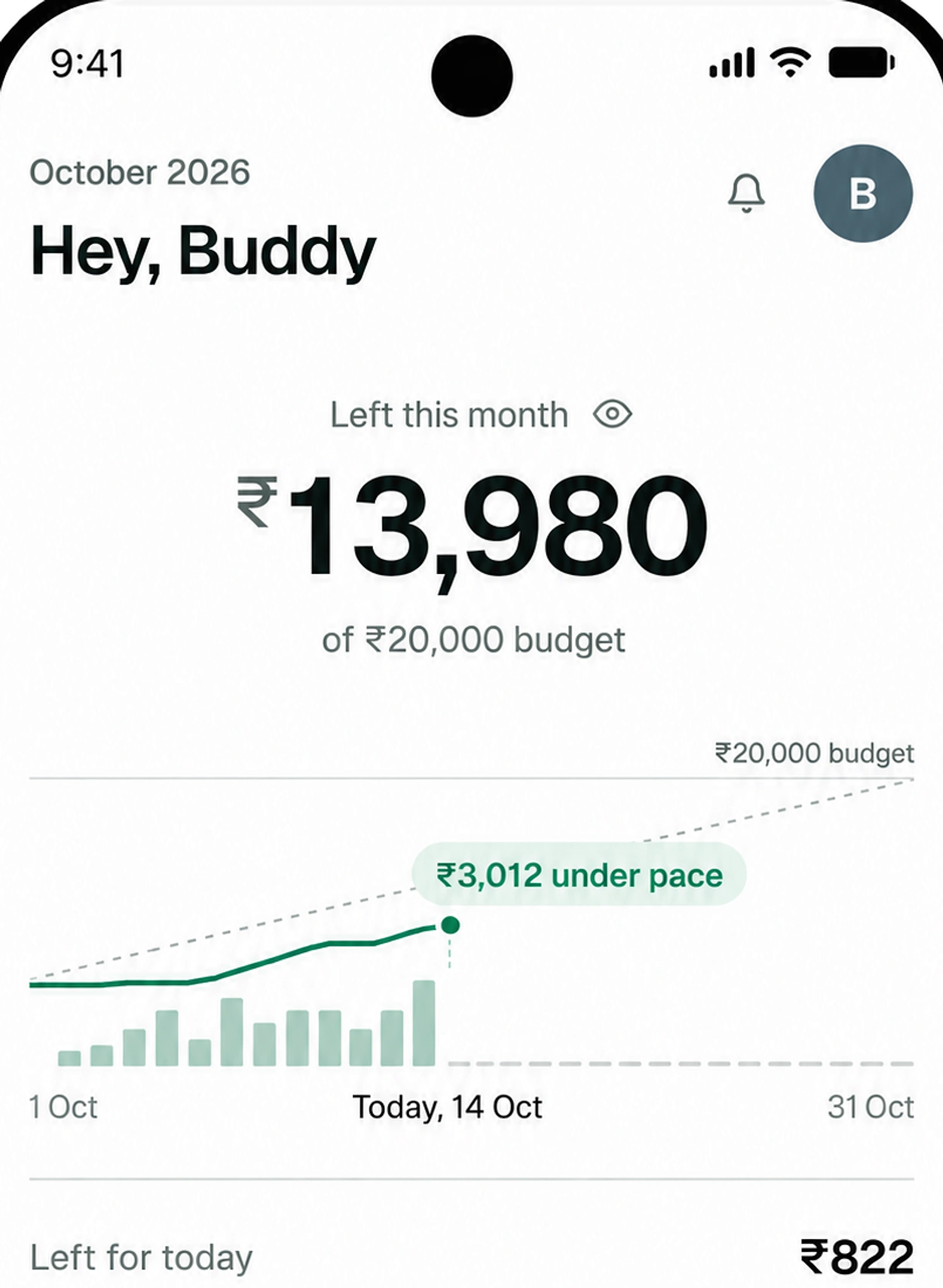
Left for today
₹822/day
₹13,980 left · 17 days to go
Spenrol divides what’s left by the days left in the month, so you get one number to check before you pay.
| Feature | SMS-based apps | Spenrol |
|---|---|---|
| Reads SMS messages | Yes, by default | Only if you turn it on |
| Counts a payment before you review it | Yes | No |
| Requires bank account link | Some | No |
| Intent tags (required/optional/impulsive) | — | Yes |
| Spending score | — | Yes |
SMS-based apps include Walnut, MoneyView and ET Money. They read your SMS by default. See the five-app comparison
Works without SMS permission
Free on Android. No card required.
Something else? Write to support@spenrol.com
Yes. SMS tracking is optional and off by default, so Spenrol works without SMS permission. You add each spend yourself, either by sharing the payment screenshot (read on your phone, not uploaded) or by typing it in, and tag it Required, Optional or Impulsive.
Spenrol reads bank alerts on your phone and uploads only the amount, date, merchant and account, never the message. Each payment waits as a card for you to review at the end of the day. Swipe to add it, skip it or archive it. Nothing counts as spending until you add it. Turning it off clears the position, so older messages are never read later.
Your transactions are stored on Spenrol's servers against your account.
Not yet. Spenrol is free on Google Play for Android. Join the iPhone waitlist and we'll email you once, when it's ready.
Walnut (now axio) reads your SMS by default and builds your spending history automatically. Spenrol reads nothing on its own unless you turn SMS tracking on, and even then every payment waits for your review before it counts. Without it, you share or type each spend, which takes more effort but means you look at every spend at least once.
For some people, yes. It works best when logging is quick, so sharing a screenshot takes about ten seconds, and Spenrol nudges you if a few days go by with nothing logged. Tagging a spend impulsive, one at a time, is also a reminder of how often it happens.
Yes, if you turn on spend nudges. They are optional and Android only. When you open a food, shopping or cab app, Spenrol shows how much of that category's budget is left and how many times you have paid that app this month. It covers 15 apps, including Swiggy, Zomato, Blinkit, Amazon and Uber, and goes away after 8 seconds. Spenrol sees that an app opened, never what you look at or buy.
Yes. The recurring payments screen lists your bills and subscriptions with a monthly total, shows what is due this week, and lets you mark each one paid. It sends a reminder 2 days before, the day before and on the due day. Any expense in History can be turned into a recurring payment.
“Being able to classify expenses as Required, Optional, or Impulsive makes it easier for me to understand my spending habits. It also makes me think twice before spending on something impulsively.”
Free on Android. SMS access is your choice, and there is no bank login.

Scan to download on your phone