Spenrol

Your UPI app shows what you paid. Spenrol shows what's left.

Google Pay and PhonePe keep a list of payments. They don't know you meant to spend ₹5,000 on groceries this month, or that you'd take back half of last week's orders. Spenrol keeps the budget, reads your payment screenshots, tracks your recurring bills, and asks one question per spend: required, optional or impulsive?

Get it on Google Play
  • SMS access optional
  • No bank login
  • Free, no ads
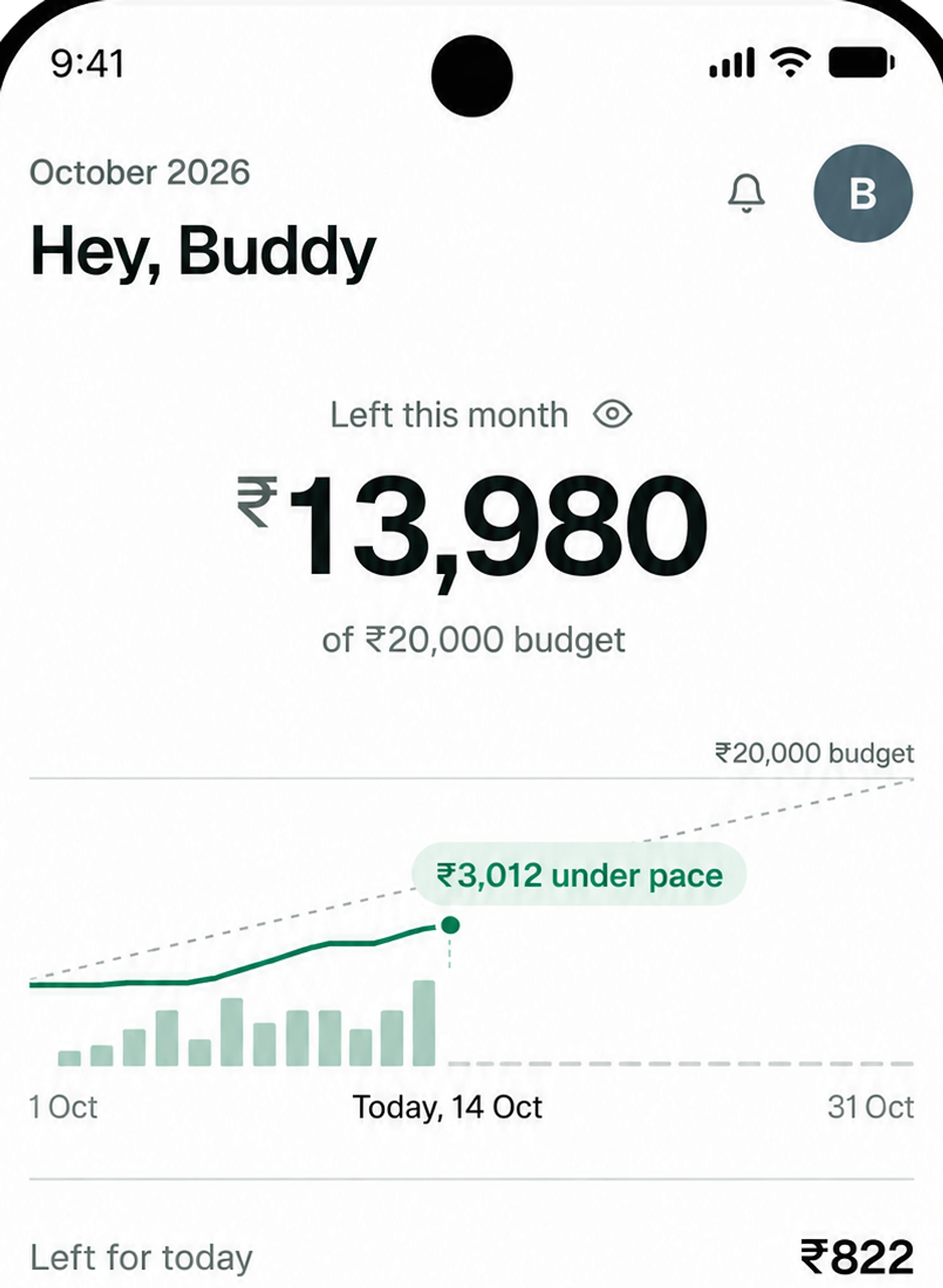
Spenrol home screen: ₹13,980 remaining of ₹20,000, under pace, ₹822 left for today, how you spent: Required ₹3,300, Optional ₹2,120, Impulsive ₹600
S

Shopping

UPI · 11 Oct · “50% off on bag”

₹600
RequiredOptionalImpulsive

Small UPI payments stop registering

74%

of UPI users say they spend more since they started paying by phone. IIIT Delhi, 2024

A UPI payment is a scan and a PIN. There's no cash to count and no card bill to wait for, so the small ones blur together: ₹180 at the chai stall, ₹245 for an auto, ₹420 on Zomato. None of them feels like much on its own.

Your payment app has the full list, but only as merchants and amounts. It can't tell you that food is at 90% of its budget with 12 days to go, because it doesn't know you have a food budget.

Spenrol does. You split your salary into categories at the start of the month, each payment comes off the right one, and the home screen shows how much is left for today.

Works with the UPI app you already use

S

Shopping

UPI · 11 Oct · “50% off on bag”

₹600
RequiredOptionalImpulsive

Share the screenshot, tag the reason

After paying on GPay, PhonePe or Paytm, share the success screen to Spenrol. Amount, merchant and category are filled in. You pick required, optional or impulsive and save.

Spending mix · October 2026

  • Required₹3,300
  • Optional₹2,120
  • Impulsive₹600

See where the month is going

The spending mix splits the month by reason. If ₹600 of ₹6,020 was Impulsive, that’s the number to work on, more than the total.

Left for today

₹822/day

₹13,980 left · 17 days to go

Know what’s left for today

Spenrol divides what’s left by the days left in the month. With ₹13,980 left and 17 days to go, that’s ₹822 a day.

Spenrol next to the apps you already have

Google Pay and PhonePe are payment apps first. Walnut reads your SMS by default. None of them asks why you spent.

FeatureGoogle PayPhonePeWalnutSpenrol
Impulsive spend tagging———
Works without SMS access—
Optional bank SMS tracking——
Bill and subscription reminders——Limited
Budget enforcement——Limited
Share-to-app screenshot capture———

Walnut logs from SMS by default. Spenrol does it only when you turn it on, and holds each payment for your review. Spenrol vs Walnut in detail

Free on Android.

SMS access optional, no card required.

If this sounds like your month

You pay for nearly everything by UPI and can't say where last month's salary went.

First job

The first salary, and no plan for it

₹18,000 on the 1st, ₹4,300 left by the 22nd. With category budgets set on day one, you find out around the 10th which one is running out.

Orders in a lot

Swiggy, Zomato and Blinkit, all on UPI

Each order is ₹300 to ₹600, so none of them feels big. Tagged impulsive one at a time, they add up to a monthly figure that does.

Trying to save

₹5,000 a month to savings, in theory

Make savings a category and assign it first, when you split the salary. Then it isn’t whatever happens to be left on the 30th.

Common questions

Something else? Write to [email protected]

Do I need to give SMS access?

No. Spenrol works without SMS, notification or bank access. You share a payment screenshot, share the confirmation text from your UPI app, or type the spend in yourself. Bank SMS tracking exists, but it is optional and off by default.

Is my data shared with anyone?

No. Your transactions are stored on Spenrol's servers against your account and aren't sold or shared with third parties. Screenshots are read on your phone and never uploaded.

Is Spenrol a UPI app?

Not yet. Today it's a budgeting app: you pay with whichever UPI app you already use, then log the payment in Spenrol. We're working toward a UPI licence from NPCI. Once we have it, Spenrol can show your budget at the moment you pay.

Can I download it now?

Yes, it's free on Google Play for Android. There's no iPhone app yet. Join the waitlist and we'll email you once, when it's ready.

How is Spenrol different from Walnut or CRED?

Walnut builds a spending history from your bank SMS, and CRED is mainly for paying credit card bills. Both show you what already happened. Spenrol starts from a budget you set at the beginning of the month, and you tag each spend, so you can see how much went on things you'd skip next time.

Is Spenrol free?

Yes. No ads, no subscription.

How do I start?

Install Spenrol from Google Play, enter your monthly budget and split it across categories. Next time you pay on UPI, share the success screen to Spenrol.

Will Spenrol warn me when I open Swiggy, Zomato or Amazon?

Yes, if you turn on spend nudges. They are optional and Android only. When you open a food, shopping or cab app, Spenrol shows how much of that category's budget is left and how many times you have paid that app this month. It covers 15 apps, including Swiggy, Zomato, Blinkit, Amazon and Uber, and goes away after 8 seconds. Spenrol sees that an app opened, never what you look at or buy.

Can Spenrol track my subscriptions and bills?

Yes. The recurring payments screen lists your bills and subscriptions with a monthly total, shows what is due this week, and lets you mark each one paid. It sends a reminder 2 days before, the day before and on the due day. Any expense in History can be turned into a recurring payment.

downloads
350+
expenses logged
3,500+
of spending tracked
₹26L+
“Being able to classify expenses as Required, Optional, or Impulsive makes it easier for me to understand my spending habits. It also makes me think twice before spending on something impulsively.”
Swaraj · By email

Start with this month's budget

Free on Android. SMS access is optional and off by default, and there is no bank login.

Get it on Google Play