
Spenrol

Your salary, planned before the Swiggy orders start

₹18,000 arrives on the 1st. By the 22nd there's ₹3,200 left and you can't say where the rest went. Spenrol is a free Android budget app for salaried people in India who pay for nearly everything by UPI. It shows what is left for today, reminds you before rent and subscriptions are due, and nudges you when you open Swiggy or Amazon.

Get it on Google Play
  • Free, no ads
  • SMS access optional
  • Spending score
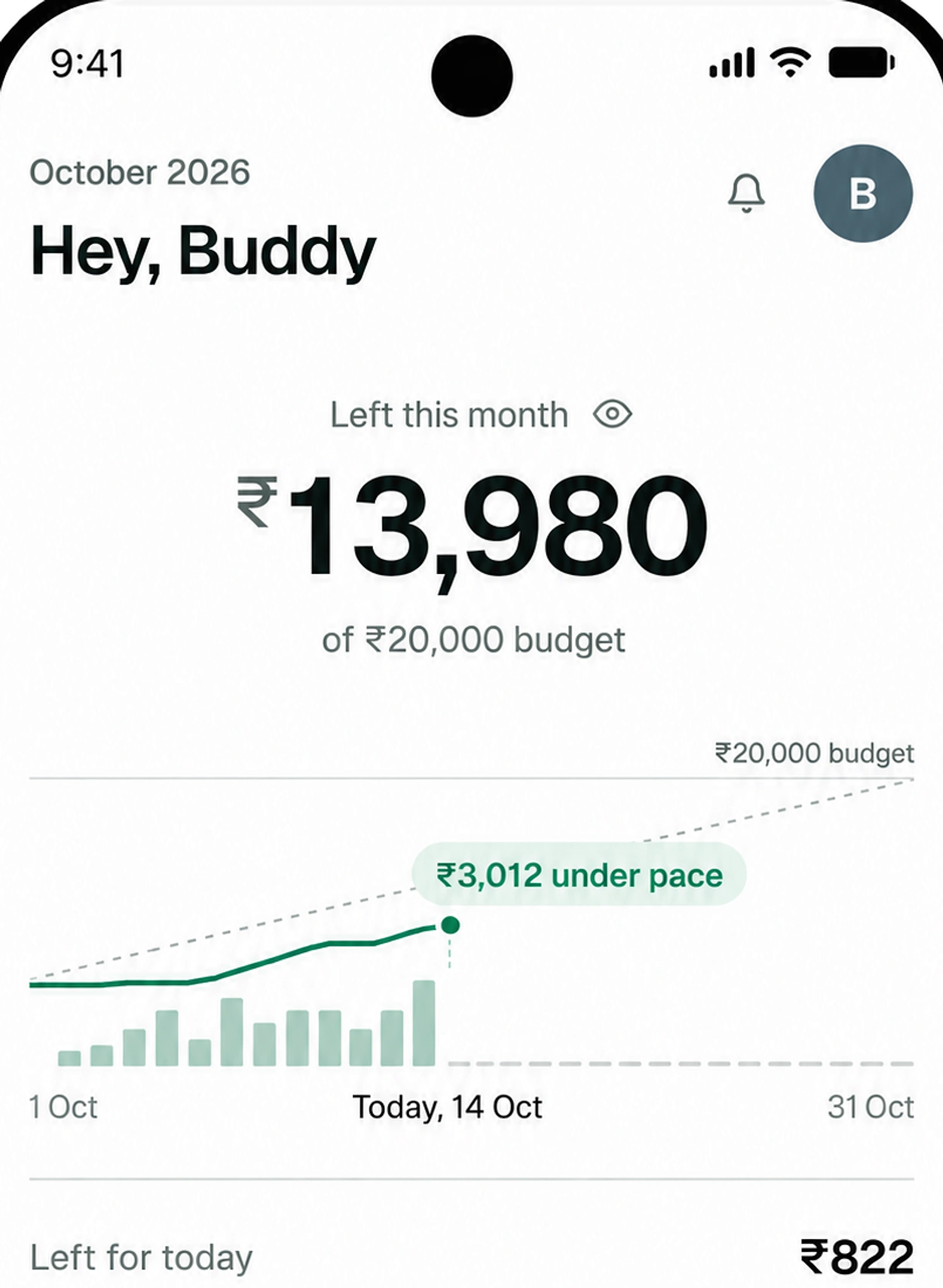
Spenrol home screen: ₹13,980 remaining of ₹20,000, under pace, ₹822 left for today, how you spent: Required ₹3,300, Optional ₹2,120, Impulsive ₹600

Left for today

₹822/day

₹13,980 left · 17 days to go

Who it's for

You're a few years into working. Rent, food delivery, the phone EMI, petrol and Amazon all go through UPI, and every month somewhere between ₹6,000 and ₹10,000 is hard to account for.

It usually isn't one big purchase. It's dozens of small ones, each paid in two taps, none of which felt like a decision at the time. Spenrol asks you to make that decision when you log the spend: was it required, optional or impulsive?

It's a budget first. You split your salary into categories at the start of the month, every payment comes off one of them, and the home screen tells you what's left for today.

How a month goes with Spenrol

Day 1: salary day

Split the salary before you spend any of it

Put rent, the EMI and subscriptions in first, then share out the rest across food, transport, shopping and savings and whatever you don’t assign waits in Not allocated. Add your bills and subscriptions to the recurring payments list so you get a reminder before each one is due. That’s your real spending money for the month, which is less than the bank balance says.

Around day 12

Check which category is running hot

Open the app and look at the spending mix. If food delivery is at ₹2,800 after 12 days and most of it is tagged impulsive, you know what to cut for the rest of the month.

Day 22 onwards

Work out what to change next month

If money is tight, check which categories went over and how your spending score moved, then set next month’s budget with that in mind.

Set it up before your next payday

Free on Android. SMS access optional, no card required.

What’s in the app

Intent tags

Tag every spend required, optional or impulsive. One tap, and Spenrol never picks for you.

Spending score

A 0–100 score for the month based on your tags and whether you stayed within budget.

Category budgets

Food, transport, shopping, bills: see what’s spent and what’s left in each, with a daily left-for-today number.

SMS optional, no bank login

Your transactions are stored against your account on Spenrol's servers.

Screenshot capture

Paid on GPay, PhonePe or Paytm? Share the payment screenshot to Spenrol and it fills in the amount and merchant.

Split bills

Turn on Split when you pay for the group, and only your share counts against your budget.

Common questions

Something else? Write to support@spenrol.com

Is Spenrol free?

Yes. No ads and no paid tier.

Do I need to connect my bank account?

No. You log each spend yourself, either by sharing the payment screenshot or typing it in. There's no bank link, and SMS tracking is optional and off by default. Spenrol is an Android app; there's no iPhone or web version yet.

I already track expenses in a spreadsheet. Why switch?

If the spreadsheet works, keep it. The difference is that Spenrol fills in the amount and merchant from a screenshot, keeps a daily left-for-today number for you, and has you tag each spend required, optional or impulsive, so you can see how much of the month was impulse without building the formulas yourself.

Will I actually keep logging every transaction?

It's the hard part of any manual tracker. Sharing a screenshot takes about ten seconds, and Spenrol sends a nudge if you haven't logged anything for a few days. Try it for one week. By then you'll know whether the habit is sticking.

Can Spenrol track my subscriptions and bills?

Yes. The recurring payments screen lists your bills and subscriptions with a monthly total, shows what is due this week, and lets you mark each one paid. It sends a reminder 2 days before, the day before and on the due day. Any expense in History can be turned into a recurring payment.

What is Left for today?

It is what is left of this month's budget divided by the days remaining, shown on the Home screen. Spend less than that today and tomorrow's number goes up.

downloads
450+
expenses logged
4,500+
of spending tracked
₹44L+
“Being able to classify expenses as Required, Optional, or Impulsive makes it easier for me to understand my spending habits. It also makes me think twice before spending on something impulsively.”
Swaraj · By email

Know where this month's salary is going

Free on Android, SMS access optional, no bank login. Set up your budget in a few minutes.

Get it on Google Play