
How much can you spend today? Your monthly budget, split by day
Spenrol divides what is left of your monthly budget by the days left in the month and shows one number for today. Log a spend and it goes down. When the month ends, you carry the leftover forward or start fresh. It is free on Android, with no bank login.
- Free, no ads
- No bank login
- SMS access optional
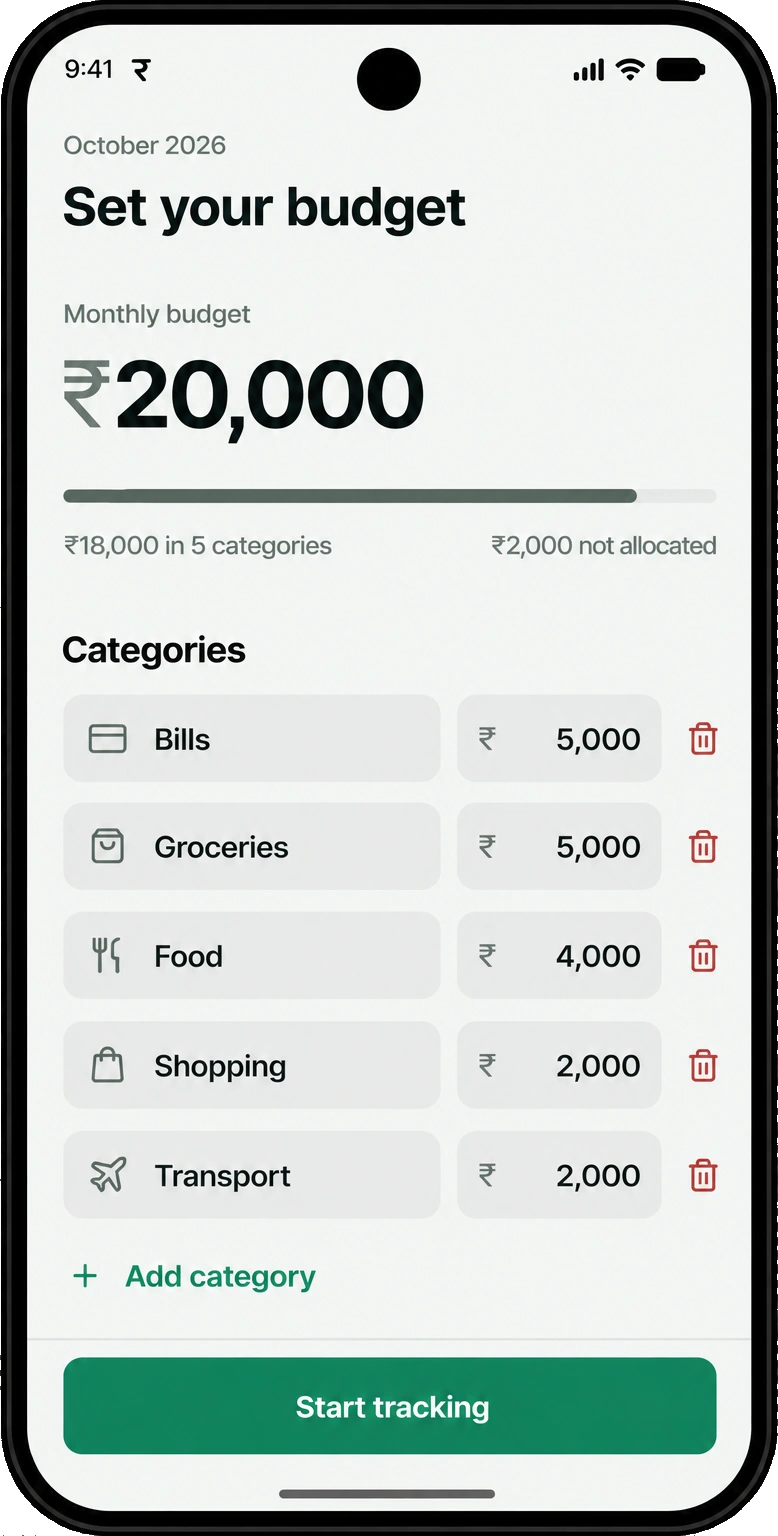
Set up a monthly budget in four steps
A budget you finish in two minutes gets used. You don’t have to plan every rupee on day one, and you can change any number later.
- 1
Set the month’s budget
Enter what you have for the month. Spenrol suggests a starting split across categories like Food, Transport, Shopping and Bills, and you change any number.
- 2
Give each category a limit
Each category has its own limit and a bar that fills as you log spending. Anything you don’t assign waits in the Not allocated bucket, so you can start with a rough plan.
- 3
Log spends as you go
Share a payment screenshot, type the amount, or review payments found in bank alerts if you turned that on. Tag each one Required, Optional or Impulsive.
- 4
Check your number on Home
Home shows what is left for today. Spend and it goes down. Near the end of the month, the same bars show which categories have room.
How the daily number is worked out
Each morning Spenrol takes the budget you have left and divides it by the days left in the month, today included. The result is today’s allowance.
Take a 30-day month. On the 10th you have ₹16,800 left and 21 days to go, counting today. ₹16,800 ÷ 21 is ₹800.
You log a ₹350 lunch and the number drops to ₹450. It does not get re-divided through the day. Tomorrow, with ₹16,450 left and 20 days to go, the new allowance is ₹822.
Amounts are rounded down to a whole rupee.
| When | Budget left | Days left | Safe to spend |
|---|---|---|---|
| 10th, morning | ₹16,800 | 21 | ₹800 |
| 10th, after a ₹350 lunch | ₹16,450 | 21 | ₹450 |
| 11th, morning | ₹16,450 | 20 | ₹822 |
Safe to spend today
-₹200
When you pass today’s share, the number goes negative. -₹200 means ₹200 over.
If you overspend
A heavy day makes tomorrow’s number smaller, because the same budget now has to cover the remaining days. Spenrol shows that plainly instead of hiding it.
If the month is already over budget
Today’s allowance is 0 and it reads as minus whatever you spend today. Earlier overspending is not spread across the other days, so one bad week doesn’t make every day negative.
Money you haven’t planned waits in Not allocated
Budgets fail when they have to be perfect. In Spenrol, whatever you haven’t given a category stays in a Not allocated bucket, so a half-finished plan still works.
When you add an expense and need a category that doesn’t exist yet, create it right there. Spenrol sets its limit aside from Not allocated and tells you how much. Add a ₹1,500 Gym category with ₹2,000 unallocated and ₹500 stays in the bucket.
Want the full method behind this? Zero-based budgeting in Spenrol covers it.
| Budget | Amount |
|---|---|
| Monthly budget | ₹20,000 |
| Bills, Groceries, Food, Shopping, Transport | ₹18,000 |
| Not allocated | ₹2,000 |
| New category: Gym, set aside from Not allocated | ₹1,500 |
| Not allocated after Gym | ₹500 |
What happens when the month ends
On the 1st, Spenrol shows what you spent and offers two ways to set up the new month.
Carry over adds last month’s unused amount to the budget. Every category limit grows in the same proportion. Start fresh keeps the same total and limits as last month.
Say October ends with ₹17,000 spent of a ₹20,000 budget. Carrying over ₹3,000 makes November ₹23,000, and each limit grows by 15%. The screen shows every new limit before you confirm, and you can edit them afterwards.
| Category | October | Start fresh | Carry over |
|---|---|---|---|
| Bills | ₹5,000 | ₹5,000 | ₹5,750 |
| Groceries | ₹5,000 | ₹5,000 | ₹5,750 |
| Food | ₹4,000 | ₹4,000 | ₹4,600 |
| Shopping | ₹2,000 | ₹2,000 | ₹2,300 |
| Transport | ₹2,000 | ₹2,000 | ₹2,300 |
| Not allocated | ₹2,000 | ₹2,000 | ₹2,300 |
| Total | ₹20,000 | ₹20,000 | ₹23,000 |
Example figures. Your own limits and spending will differ.
What this doesn’t do
- It doesn’t sync your bank. You log spends by screenshot or by typing, or turn on optional bank SMS tracking on Android. The daily number is only as complete as what you log.
- It doesn’t predict. The number divides what is left by the days left. It does not guess your future spending.
- It doesn’t move money. Spenrol is a budgeting app, not a bank. You pay in your own UPI app.
- It is on Android only. An iPhone version is not released yet.
Free on Android.
SMS access optional, no card required.
Common questions
Something else? Write to support@spenrol.com
How is safe to spend today calculated?
Spenrol takes what is left of your monthly budget as of this morning and divides it by the days left in the month, counting today. That is today’s allowance. Whatever you log today comes off it rupee for rupee, and it is not re-divided during the day.
What if I overspend one day?
The number goes negative: -₹200 means you spent ₹200 more than today’s share. Tomorrow morning the budget that is left is divided across the remaining days, so a heavy day makes the next days’ numbers smaller.
What if I am already over budget for the month?
Today’s allowance is 0, and it reads as minus whatever you spend today. Spenrol does not spread the earlier overspend across the other days.
Does the number include rent and bills?
It works from your whole monthly budget, so everything you have logged against any category has already come out of what is left. If you log rent in a Rent category, it is already counted.
What happens to the leftover at the end of the month?
At the start of the next month you choose: carry the unused amount forward, which raises every category limit in proportion, or start fresh with the same total and limits. You can edit either afterwards.
Does it need SMS access or a bank login?
No bank login. You log spends by sharing a payment screenshot or typing them in. Reading bank SMS is optional, off by default, and every payment it finds waits for your review.
Plan your month in Spenrol
Free on Android. Set a budget in a couple of minutes.

Scan to download on your phone