
Right: needed
Adds the payment as Required.
Each payment found in your bank alerts becomes a card. One swipe adds it to your budget and tells Spenrol why you spent it.
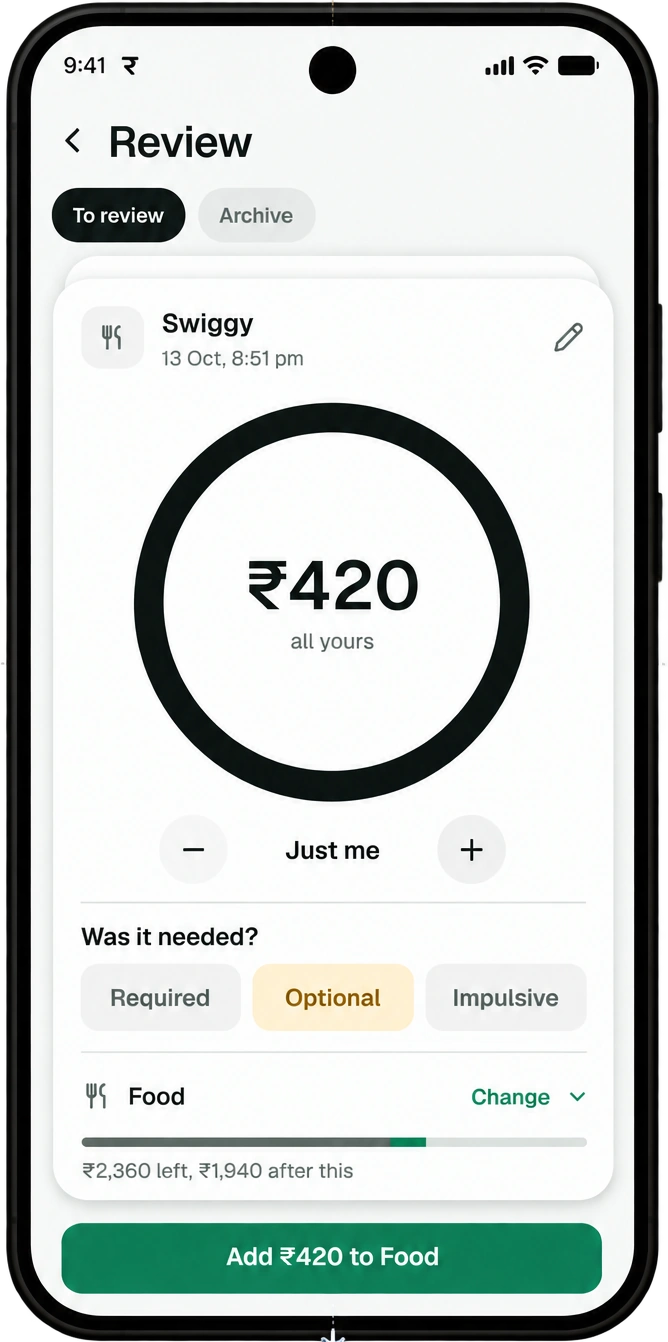
Swipe right if you needed it. Swipe left if it was impulsive. Swipe up if it was optional. Swipe down to move it to the Archive.
The swipe adds the expense and answers “Was it needed?” in one go. Under the card, Spenrol shows what that category has left before and after.
Some payments aren’t spending, like a card bill or a refund. Those cards offer different choices, such as “Not an expense” and “Add anyway”. Archived payments wait in the Archive tab for a week.
Review works with bank SMS tracking, which is optional and off by default.
Payments come up one card at a time, oldest first. Pick a category if the card doesn’t have one, and the button spells out the move, like “Add ₹420 to Food”, so you can see where the money goes before you commit.
If you haven’t said whether you needed it yet, the button asks “Was it needed?” first.
A refund card offers “Take ₹420 off”, which lowers what you have spent, or “Keep the expense as it is”.
A payment that looks like an autopay offers “Add to Recurring payments”, until a recurring payment with that name already exists.
Spenrol says “All caught up”. The first time you open Review, a hint shows that you can swipe and the first card wiggles. Every swipe also has a button, and screen readers get the same actions by name.
Adds the payment as Required.
Adds the payment as Impulsive.
Adds the payment as Optional.
Moves it to the Archive tab for a week. Restore it any time before.
Something else? Write to support@spenrol.com
Review shows payments found from bank alerts, and SMS tracking is optional and off by default. Without it you log spends by screenshot or by typing.
No. Nothing counts toward your budget until you add it.
Yes. Open the Archive tab and tap Restore. Archived payments clear out after a week.
Not yet. Review and SMS tracking are on Android. You can join the iPhone waitlist.
Oldest first, one at a time.
“Take ₹420 off” lowers what you have spent in that category. “Keep the expense as it is” leaves your spending alone.
Yes. The card has a button, and each swipe is also available as a named action for screen readers.
Free on Android. Swipe through your payments in under a minute.

Scan to download on your phone